Context
IReplayLayout
- Web
- Android
- IOS
import type { IReplayLayout } from '@picsart/web-replay-sdk';
import com.picsart.media.primitives.Size
| Property | Type | Required | Description |
|---|---|---|---|
| width | number | yes | The width of the export size in pixels |
| height | number | yes | The height of the export size in pixels |
IReplayLayerType
- Web
- Android
- IOS
import type { IReplayLayer } from '@picsart/web-replay-sdk';
type IReplayLayerType = 'image' | 'text' | 'shape' | 'group' | 'video' | 'audio';
import com.picsart.media.objects.Layer.Type
IReplayAnimationDirection
- Web
- Android
- IOS
import type { IReplayAnimationDirection } from '@picsart/web-replay-sdk';
type IReplayAnimationDirection = 'normal' | 'reverse' | 'alternate' | 'alternate-reverse';
| Values | Description |
|---|---|
normal | The animation plays forwards each cycle. In other words, each time the animation cycles, the animation will reset to the beginning state and start over again. |
reverse | The animation plays backwards each cycle. In other words, each time the animation cycles, the animation will reset to the end state and start over again |
alternate | The animation reverses direction each cycle, with the first iteration being played forwards. The count to determine if a cycle is even or odd starts at one. |
alternate-reverse | The animation reverses direction each cycle, with the first iteration being played backwards. The count to determine if a cycle is even or odd starts at one. |
For more information please check this link
IReplayAnimationTimingFunction
- Web
- Android
- IOS
import type { IReplayAnimationTimingFunction } from '@picsart/web-replay-sdk';
type IReplayAnimationTimingFunction =
  | 's'
  | 'l'
  | 'i'
  | 'o'
  | 'ioqrt'
  | 'iocbc'
  | 'ioqnt'
  | 'iexp'
  | 'oexp'
  | 'ioexp'
  | 'obnc'
  | 'ibnc'
  | 'iobnc'
  | 'iel'
  | 'oel'
  | 'ioel'
  | 'b';
import com.picsart.media.primitives.Animation.TimingFunction
The below is the mapping of the original namings of the function in CSS and what we have in Replay format
Step => 's'
Linear => 'l'
EaseIn => 'i'
Easeout => 'o'
EaseInOutQuart => 'ioqrt'
EaseInOutCubic => 'iocbc'
EaseInOutQuint => 'ioqnt'
EaseInExpo => 'iexp'
EaseOutExpo => 'oexp'
EaseInOutExpo => 'ioexp'
EaseOutBounce => 'obnc'
EaseInBounce => 'ibnc'
EaseInOutBounce => 'iobnc'
EaseInElastic => 'iel'
EaseOutElastic => 'oel'
EaseInOutElastic => 'ioel'
BezierCurve=> 'b'
For more information please check this link
IReplayLayerTransform
- Web
- Android
- IOS
import type { IReplayLayerTransform } from '@picsart/web-replay-sdk';
import com.picsart.media.objects.TransformProps
| Property | Type | Required | Description |
|---|---|---|---|
| x | IReplayLayerProperty<number> | yes | x coordinate value of the layer. The value is in relative format. Defaults to 0 |
| y | IReplayLayerProperty<number> | yes | y coordinate value of the layer. The value is in relative format. Defaults to 0 |
| scaleX | IReplayLayerProperty<number> | yes | scaleX of the layer. The value is in relative format. Defaults to 1 |
| scaleY | IReplayLayerProperty<number> | yes | scaleY of the layer. The value is in relative format. Defaults to 1 |
| rotation | IReplayLayerProperty<number> | yes | rotation of the layer. The value is in degrees. Value range 0 - 360. Defaults to 0 |
IReplayLayerAppearance
- Web
- Android
- IOS
import type { IReplayLayerAppearance } from '@picsart/web-replay-sdk';
import com.picsart.media.objects.TimeFrameProps
| Property | Type | Required | Description |
|---|---|---|---|
| duration | IReplayLayerProperty<number> | yes | duration of how much the layer will be visible during the animation counted from startTime. For editing which does not include animation one can use -1, which will mean it does not disappear. Defaults to -1 |
| startTime | IReplayLayerProperty<number> | yes | startTime of the layer when it must become visible. The value is in relative format. Defaults to 0 |
IReplayLayerAnimation
- Web
- Android
- IOS
import type { IReplayLayerAnimation } from '@picsart/web-replay-sdk';
| Property | Type | Required | Description |
|---|---|---|---|
| animations | IReplayLayerProperty<IReplayAnimation<Props>> | yes | An array of animations for the given layer. Props here is a generic type, which corresponds to the layer property keys, which are animated. |
IReplayAnimationKeyFrame
- Web
- Android
- IOS
import type { IReplayAnimationKeyFrame } from '@picsart/web-replay-sdk';
import com.picsart.media.primitives.Animation.KeyFrame
| Property | Type | Required | Description |
|---|---|---|---|
| percent | number | yes | A percentage of the time through the animation sequence at which the specified keyframe should occur |
| values | Partial<Props> | yes | The values for the given keyframe percentage to be achieved |
The behavior of the keyframes is much similar to CSS keyframes. NOTE in CSS the keyframe is working per property, but here you're able to provide a map of properties and their values to be animated. If the property value is not changed during that keyframe, it can be skipped.
IReplayAnimation
- Web
- Android
- IOS
import type { IReplayAnimation } from '@picsart/web-replay-sdk';
import com.picsart.media.primitives.Animation
| Property | Type | Required | Description |
|---|---|---|---|
| uuid | UUIDString | yes | The unique identifier of the animation item |
| renderer | IRenderer | yes | renderer of the animation |
| params | JsonObject | yes | The property is for storing animation related information. |
| delay | number | yes | The amount of time to wait from applying the animation to an element before beginning to perform the animation. Note that delay is being calculated from the point when the layer has been created. It is also important that this values is supporting also negative values, which means, that the animation will be visible on the screen at some intermediate state. Defaults to 0 |
| iterationCount | number | yes | The property sets the number of times an animation sequence should be played before stopping |
| direction | IReplayAnimationDirection | yes | The property sets whether an animation should play forward, backward, or alternate back and forth between playing the sequence forward and backward |
| timingFunction | IReplayAnimationTimingFunction | yes | property sets how an animation progresses through the duration of each cycle |
| keyframes | IReplayAnimationKeyFrame<Props>[] | yes | The property defines layer's properties' behavior and steps for them to be animated |
The behavior of the keyframes is much similar to CSS keyframes
IReplayBaseLayerProps
- Web
- Android
- IOS
import type { IReplayBaseLayerProps } from '@picsart/web-replay-sdk';
import com.picsart.media.objects.VisualProps
| Property | Type | Required | Description |
|---|---|---|---|
| hidden | IReplayLayerProperty<boolean> | yes | The value specified if the layer is visible on the screen or not |
| opacity | IReplayLayerProperty<number> | yes | Changes the layer appearance alpha channel. The value range is from 0-1. Defaults to 1 |
| blendMode | IReplayLayerProperty<IReplayLayerBlendMode> | yes | Defines the blend mode of the layer. Defaults to source-over |
IReplayBaseLayer
This is an abstract interface defining the general shape of all layers.
- Web
- Android
- IOS
import type { IReplayBaseLayer } from '@picsart/web-replay-sdk';
import com.picsart.media.objects.Layer
| Property | Type | Required | Description |
|---|---|---|---|
| name | string | yes | The name fo the given layer |
| locked | boolean | yes | Specifies whether the layer is locked. If set to true the layer cannot be edited. The make the layer editable, one need to turn the lock off(make it false). Defaults to false |
| meta | JsonObject | yes | The property is for storing layer related information, which is not related to the actual rendering. There are certain limitations to due to platform specifics. So not each key that is changed in the layer.meta will be replicated in the platform. Here is a list of properties which are "reserved": type, resource, isPremium, source, usedTools, url, miniappPackageId, resourceId, groupId, templateId, templateOriginalId, license, pageTitle, resultUrl, inPreviewMode, locked, hidden, duration, loop, presetName, animationSettings |
| type | IReplayLayerType | yes | The type of the layer |
| renderer | IRenderer | yes | renderer of the layer |
| fallbackLayer | IReplayLayer | no | fallback layer when failed to load or execute renderer |
| mediaType | string | yes | This is a string pointing the current layer media type, in order to be understandable for different tools. It is a free string, in case it matches for different tools, that means they can work with that layer.Here is the Picsart editors' current in used Layer media types |
| props | T & IReplayLayerTransform & IReplayLayerAppearance & IReplayBaseLayerProps & IReplayLayerEffects & IReplayLayerAnimation<{ [P in keyof (T & IReplayLayerTransform & IReplayLayerAppearance & IReplayBaseLayerProps)]: (T & IReplayLayerTransform & IReplayLayerAppearance & IReplayBaseLayerProps)[P] extends IReplayLayerProperty<infer U> ? U : never; }> | yes | The properties of the layer, where T is generic interface representing the layer specific props(like audio property for audio type layer). Explanation of complex type - The props here are presented always extended from animation properties, base properties and transformation properties. Besides that for animation we need to form all the possible layers, that's why the infer union is used |
IReplayVisualLayer
- Web
- Android
- IOS
import type { IReplayVisualLayer } from '@picsart/web-replay-sdk';
IReplayVisualLayerProps
| Property | Type | Required | Description |
|---|---|---|---|
| width | number | yes | determines the resource size which is requested from the renderer |
| height | number | yes | determines the resource size which is requested from the renderer |
| rendererData | JsonObject | no | This data must be used to provide the renderer the required information for content drawing |
📐 Geometry: Learn more about VisualLayer geometry in Format Coordinate System & Geometry → VisualLayer
IReplayTextLayer
- Web
- Android
- IOS
import type { IReplayTextLayer } from '@picsart/web-replay-sdk';
type IReplayTextLayer = IReplayBaseLayer<IReplayTextLayerProps>;
import com.picsart.media.objects.TextLayer
IReplayTextLayerAlignment
- Web
- Android
- IOS
import type { IReplayTextLayerAlignment } from '@picsart/web-replay-sdk';
type IReplayTextLayerAlignment = 'left' | 'center' | 'right';
import com.picsart.media.primitives.enums.HorizontalTextAlignment
| Values | Description |
|---|---|
left | Align the text context in the layer's width to left |
center | Align the text context in the layer's width to center |
right | Align the text context in the layer's width to right |
IReplayTextLayerFormat
- Web
- Android
- IOS
import type { IReplayTextLayerFormat } from '@picsart/web-replay-sdk';
type IReplayTextLayerFormat = 'bold' | 'italic' | 'underline' | 'strike';
import com.picsart.media.primitives.enums.TextFormat
| Values | Description |
|---|---|
bold | Specifies if the text is bold |
italic | Specifies if the text is italic |
underline | Specifies if the text is underlined |
strikethrough | Specifies if the text is |
IReplayTextLayerLineFormat
- Web
- Android
- IOS
import type { IReplayTextLayerLineFormat } from '@picsart/web-replay-sdk';
type IReplayTextLayerLineFormat = 'bullet' | 'numeric';
| Values | Description |
|---|---|
bullet | Specifies that the line is formatted as a bulleted list item |
numeric | Specifies that the line is formatted as a numbered list item |
IReplayTextLineFormat
- Web
- Android
- IOS
import type { IReplayTextLineFormat } from '@picsart/web-replay-sdk';
| Property | Type | Required | Description |
|---|---|---|---|
| list | IReplayTextLayerLineFormat | no | Specifies the list type for the line. Can be bullet for bulleted lists or numeric for numbered lists |
| indent | number | no | Specifies the indentation level of the line. Used for creating nested lists |
IReplayTextPerspectivePoints
- Web
- Android
- IOS
import type { IReplayTextPerspectivePoints } from '@picsart/web-replay-sdk';
type IReplayTextPerspectivePoints = null | [Point, Point, Point, Point];
| Values | Description |
|---|---|
null | The text has no perspective transformation |
| [Point, Point, Point, Point] | The text has been transformed with perspective. The perspective is described with 4 points. All the points are being calculated from the layer's coordinate space. The text layer is being rendered in the resulting box |
IReplayTextLayerRange
- Web
- Android
- IOS
import type { IReplayTextLayerRange } from '@picsart/web-replay-sdk';
import com.picsart.media.objects.TextLayer
| Property | Type | Required | Description |
|---|---|---|---|
| fill | null | IReplayLayerPattern | yes | Specifies how the text content is being filled. If the values is equal to null than the layer corresponding property value will be used. |
| fontSize | null | number | yes | Specifies the font size of the text layer as a positive number in pixels. If the values is equal to null than the layer corresponding property value will be used. |
| text | string | yes | Sequence of characters that to which the given range rules apply |
| format | null | IReplayTextLayerFormat | yes | An array of text formats for this range. If the values is equal to null than the layer corresponding property value will be used. |
| lineFormat | null | IReplayTextLineFormat | yes | Specifies the line formatting for this range, including list type and indentation. If the value is null, no list formatting is applied. |
IReplayTextLayerProps
- Web
- Android
- IOS
import type { IReplayTextLayerProps } from '@picsart/web-replay-sdk';
import com.picsart.media.objects.TextLayer.Props
| Property | Type | Required | Description |
|---|---|---|---|
| bend | IReplayLayerProperty<number> | yes | Specifies how much the text has been bended. The value range is from -50 to 50. The bend is being calculated from the center of the text content. The negative values are moving the bending circle center away from the bottom side of the text. Correspondingly the positive values are moving the bending circle center away from the top side of the text. Note text content width is being changed if bending is applied |
| path | string | yes | Specifies the path on which text will be drawn. View box is considered absolute width/height of the text |
| width | IReplayLayerProperty<number> | yes | Specifies the text layer width. The value is in relative format. Defaults to 1 |
| lineHeight | IReplayLayerProperty<number> | yes | The line height of the text layer |
| letterSpacing | IReplayLayerProperty<number> | yes | The letter spacing of the text layer |
| stroke | IReplayLayerProperty<IReplayStroke> | yes | The stroke of the text. Defaults to null |
| shadow | IReplayLayerProperty<IReplayShadow> | yes | The shadow of the text. Defaults to null |
| font | IReplayLayerProperty<IReplayFontResource> | yes | The font resource to be used for rendering the text layer |
| perspectivePoints | IReplayLayerProperty<IReplayTextPerspectivePoints> | yes | The layer's perspective transformation box. Defaults to null |
| ranges | IReplayLayerProperty<IReplayTextLayerRange[]> | yes | An array of text ranges. This value is holding the text content |
| alignment | IReplayLayerProperty<IReplayTextLayerAlignment[]> | yes | The text content alignment |
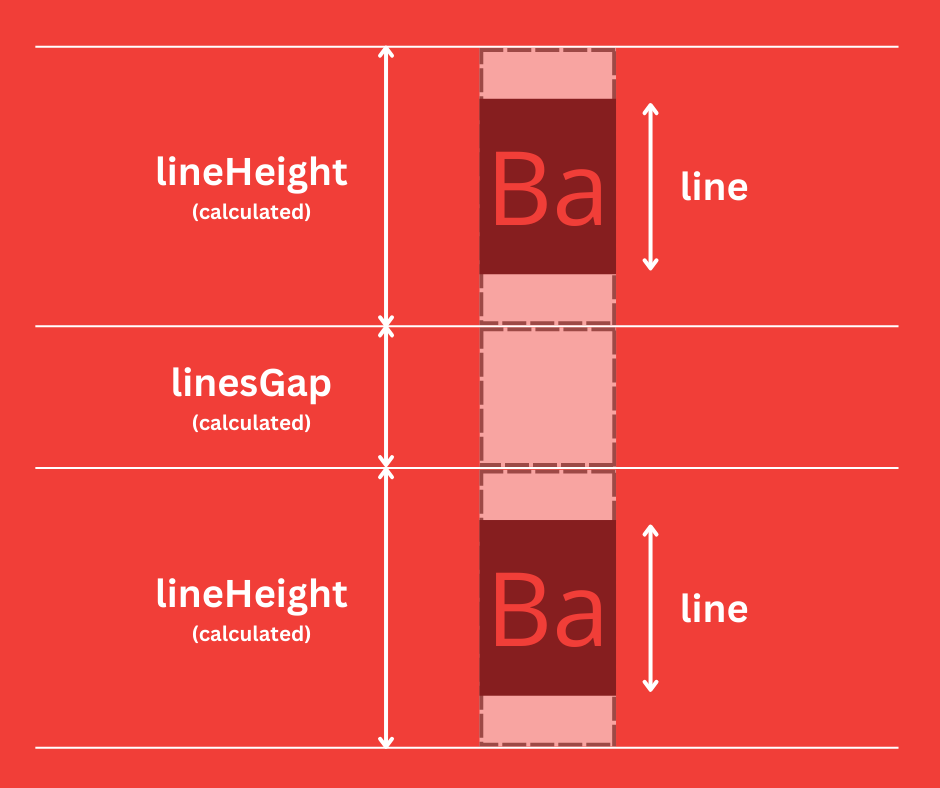
📐 Geometry: Learn more about TextLayer geometry in Format Coordinate System & Geometry → TextLayer
IReplayAudioLayer
- Web
- Android
- IOS
import type { IReplayAudioLayer } from '@picsart/web-replay-sdk';
type IReplayAudioLayer = IReplayBaseLayer<IReplayAudioLayerProps>;
import com.picsart.media.objects.AudioLayer
IReplayAudioLayerProps
- Web
- Android
- IOS
import type { IReplayAudioLayerProps } from '@picsart/web-replay-sdk';
import com.picsart.media.objects.AudioLayer.Props
| Property | Type | Required | Description |
|---|---|---|---|
| volume | IReplayLayerProperty<number> | yes | Audio volume is in percentage. Value range is from 0 to 100. |
| trimStart | IReplayLayerProperty<number> | yes | The millisecond within the audio resource duration range from where to start the audio |
| trimEnd | IReplayLayerProperty<number> | yes | The millisecond within the audio resource duration range from where to end the audio |
| repeat | IReplayLayerProperty<boolean> | no | flag (true or false) that determines whether the content in the layer should loop to match the layer's total duration. Defaults to false |
| speed | IReplayLayerProperty<number> | no | The playback speed of audio content Defaults to 1.0 |
| muted | IReplayLayerProperty<boolean> | no | flag (true or false) that determines whether the audio content should be muted (no sound output). Defaults to false |
| audio | IReplayLayerProperty<IReplayAudioResource> | yes | The resource for the audio |
Audio layers do not carry an effects stack — props.effects is only present on visual layers (image, text, shape, group, video, visual).
⚠️ Note:
| Scenario | Layer Duration (seconds) | Audio Duration (seconds) | Speed | Repeat | Behavior/Outcome |
|---|---|---|---|---|---|
| Audio shorter than layer duration, normal speed, no repeat | 10 | 5 | 1.0 | No | It plays once at normal speed, and after the 5s of audio, silence remains for the remaining 5 seconds. |
| Audio shorter than layer duration, normal speed, with repeat | 10 | 5 | 1.0 | Yes | It plays at normal speed and repeats continuously until the full 10-second layer duration is reached. |
| Audio shorter than layer duration, half speed, with repeat | 15 | 5 | 0.5 | Yes | It plays at half speed and repeats continuously throughout the entire 15-second layer duration. |
| Speed-adjusted audio shorter than layer duration, no repeat | 30 | 15 | 2.0 | No | The audio plays at double speed. Since the speed-adjusted audio duration is shorter than the layer duration, silence is played for the remaining time after the audio ends. |
| Audio shorter than layer duration, normal speed, with repeat | 25 | 10 | 1.0 | Yes | It plays at normal speed and repeats continuously for the entire 25-second layer duration. |
| Audio equal to layer duration, normal speed, no repeat | 10 | 10 | 1.0 | No | It plays at normal speed without repeating, and no additional silence is added after the audio ends. |
| Audio longer than layer duration, normal speed, no repeat | 5 | 10 | 1.0 | No | It plays the first 5 seconds of the audio at normal speed, and the rest is cut off. |
| Audio longer than layer duration, half speed, no repeat | 5 | 10 | 0.5 | No | It plays the first 2.5 seconds at half speed, and the rest is cut off. |
| Audio longer than layer duration, normal speed, with repeat | 5 | 10 | 1.0 | Yes | The audio duration is longer than the layer duration, but it repeats the first 5 seconds continuously for the entire layer duration. |
| Audio shorter than layer duration, double speed, with repeat | 20 | 10 | 2.0 | Yes | The audio duration is shorter than the layer duration. It plays at double speed and repeats continuously until the layer duration ends. |
| Speed-adjusted audio shorter than layer duration, half speed, no repeat | 30 | 10 | 0.5 | No | The audio plays at half speed, extending its playtime to 20 seconds, with silence filling the remaining layer duration. |
| Audio shorter than layer duration, 1.5x speed, no repeat | 20 | 12 | 1.5 | No | The audio plays faster at 1.5x speed, reducing its duration, and silence is played for the remainder of the layer duration. |
| Audio longer than layer duration, 2x speed, no repeat | 5 | 10 | 2.0 | No | The audio duration is longer than the layer duration, but it plays 2 times faster and the adjusted duration is equal to the layer duration. |
IReplayGroupLayer
- Web
- Android
- IOS
import type { IReplayGroupLayer } from '@picsart/web-replay-sdk';
type IReplayGroupLayer = IReplayBaseLayer<IReplayGroupLayerProps>;
import com.picsart.media.objects.GroupLayer
IReplayGroupLayerProps
- Web
- Android
- IOS
import type { IReplayGroupLayerProps } from '@picsart/web-replay-sdk';
| Property | Type | Required | Description |
|---|---|---|---|
| width | IReplayLayerProperty<number> | yes | The width of the group layer. The value is in relative format. Defaults to 1 |
| height | IReplayLayerProperty<number> | yes | The height of the group layer. The value is in relative format. Defaults to 1 |
| children | IReplayLayerProperty<UUIDString[]> | yes | The layer ids that are inside this group. Defaults to [] |
import com.picsart.media.objects.ImageLayer
📐 Geometry: Learn more about GroupLayer geometry in Format Coordinate System & Geometry → GroupLayer
IReplayImageLayer
- Web
- Android
- IOS
import type { IReplayImageLayer } from '@picsart/web-replay-sdk';
type IReplayImageLayer = IReplayBaseLayer<IReplayImageLayerProps>;
import com.picsart.media.objects.ImageLayer
IReplayImageLayerProps
- Web
- Android
- IOS
| Property | Type | Required | Description |
|---|---|---|---|
| stroke | IReplayLayerProperty<IReplayStroke> | no | The stroke for the image. The stroke is not considered inside image width and height. Defaults to null |
| shadow | IReplayLayerProperty<IReplayShadow> | no | The shadow for the image. Defaults to null |
| image | IReplayLayerProperty<IReplayPhotoResource> | yes | The image media resource |
📐 Geometry: Learn more about ImageLayer geometry in Format Coordinate System & Geometry → ImageLayer
IReplayShapeLayer
import type { IReplayShapeLayer } from '@picsart/web-replay-sdk';
type IReplayShapeLayer = IReplayBaseLayer<IReplayShapeLayerProps>;
SVGPathString
import type { SVGPathString } from '@picsart/web-replay-sdk';
type SVGPathString = string;
This attribute defines the shape of the path.
The SVGPathString is the SVG's <path /> tag's d attribute value. For more please check this link
IReplayShapePath
import type { IReplayShapePath } from '@picsart/web-replay-sdk';
| Property | Type | Required | Description |
|---|---|---|---|
| id | UUIDString | yes | The unique identifier for path adjust object |
| d | SVGPathString | yes | The path representation to render |
| stroke | IReplayStroke | yes | The path's stroke |
| fill | IReplayLayerPattern | yes | The path's fill |
IReplayShapeLayerProps
- Web
- Android
- IOS
import type { IReplayShapeLayerProps } from '@picsart/web-replay-sdk';
| Property | Type | Required | Description |
|---|---|---|---|
| width | IReplayLayerProperty<number> | yes | The width of the layer. The value is in relative format. Defaults to 1 |
| height | IReplayLayerProperty<number> | yes | The height of the layer. The value is in relative format. Defaults to 1 |
| stroke | IReplayLayerProperty<IReplayStroke> | no | The stroke for the whole shape. The stroke is not considered inside shape's width and height. Defaults to null |
| shadow | IReplayLayerProperty<IReplayShadow> | no | The shadow for the shape. Defaults to null |
| shape | IReplayLayerProperty<IReplaySvgResource> | yes | The shape media resource. This property is holding the original resource of the shape(used when first time was rendered) |
| paths | IReplayLayerProperty<IReplayShapePath>[] | no | This property is used for editing the shape path. Defaults to [] |
import com.picsart.media.primitives.objects.ShapeLayer
📐 Geometry: Learn more about ShapeLayer geometry in Format Coordinate System & Geometry → ShapeLayer
IReplayVideoLayer
- Web
- Android
- IOS
import type { IReplayVideoLayer } from '@picsart/web-replay-sdk';
type IReplayVideoLayer = IReplayBaseLayer<IReplayVideoLayerProps>;
import com.picsart.media.primitives.objects.VideoLayer
IReplayVideoLayerProps
- Web
- Android
- IOS
import type { IReplayVideoLayerProps } from '@picsart/web-replay-sdk';
com.picsart.media.primitives.objects.VideoLayer.Props
| Property | Type | Required | Description |
|---|---|---|---|
| volume | IReplayLayerProperty<number> | yes | Video volume is in percentage. Value range is from 0 to 100. |
| trimStart | IReplayLayerProperty<number> | yes | The millisecond within the video resource duration range from where to start the video |
| trimEnd | IReplayLayerProperty<number> | yes | The millisecond within the video resource duration range from where to end the video |
| repeat | IReplayLayerProperty<boolean> | no | flag (true or false) that determines whether the content in the layer should loop to match the layer's total duration. Defaults to false |
| speed | IReplayLayerProperty<number> | no | The playback speed of video content Defaults to 1.0. |
| muted | IReplayLayerProperty<boolean> | no | flag (true or false) that determines whether the video content should be muted (no sound output). Defaults to false |
| video | IReplayLayerProperty<IReplayVideoResource> | yes | The resource for the video |
⚠️ Note:
| Scenario | Layer Duration (seconds) | Video Duration (seconds) | Speed | Repeat | Behavior/Outcome |
|---|---|---|---|---|---|
| Video shorter than layer duration, normal speed, no repeat | 10 | 5 | 1.0 | No | It plays once at normal speed, and after the 5s of video, the last frame remains visible for the remaining 5 seconds. |
| Video shorter than layer duration, normal speed, with repeat | 10 | 5 | 1.0 | Yes | . It plays at normal speed and repeats continuously until the full 10-second layer duration is reached. |
| Video shorter than layer duration, half speed, with repeat | 15 | 5 | 0.5 | Yes | It plays at half speed and repeats continuously throughout the entire 15-second layer duration. |
| Speed-adjusted video shorter than layer duration, no repeat | 30 | 15 | 2.0 | No | The video plays at double speed. Since the speed-adjusted video duration is shorter than the layer duration, the last frame is displayed for the remaining time after the video ends. |
| Video shorter than layer duration, normal speed, with repeat | 25 | 10 | 1.0 | Yes | It plays at normal speed and repeats continuously for the entire 25-second layer duration. |
| Video equal to layer duration, normal speed, no repeat | 10 | 10 | 1.0 | No | It plays at normal speed without repeating, and no additional frames are displayed after the video ends. |
| Video longer than layer duration, normal speed, no repeat | 5 | 10 | 1.0 | No | It plays the first 5 seconds of the video at normal speed, and the rest is cut off. |
| Video longer than layer duration, half speed, no repeat | 5 | 10 | 0.5 | No | It plays the first 2.5 seconds at half speed, and the rest is cut off. |
| Video longer than layer duration, normal speed, with repeat | 5 | 10 | 1.0 | Yes | The video duration is longer than the layer duration, but it repeats the first 5 seconds continuously for the entire layer duration. |
| Video shorter than layer duration, double speed, with repeat | 20 | 10 | 2.0 | Yes | The video duration is shorter than the layer duration. It plays at double speed and repeats continuously until the layer duration ends. |
| Speed-adjusted video shorter than layer duration, half speed, no repeat | 30 | 10 | 0.5 | No | The video plays at half speed, extending its playtime to 20 seconds, with the last frame displayed for the remaining layer duration. |
| Video shorter than layer duration, 1.5x speed, no repeat | 20 | 12 | 1.5 | No | The video plays faster at 1.5x speed, reducing its duration, and the last frame is shown for the remainder of the layer duration. |
| Video longer than layer duration, 2x speed, no repeat | 5 | 10 | 2.0 | No | The video duration is longer than the layer duration, but it plays 2 time faster and adjusted duration is equal to layer duration |
📐 Geometry: Learn more about VideoLayer geometry in Format Coordinate System & Geometry → VideoLayer
IReplayLayer
- Web
- Android
- IOS
import type { IReplayLayer } from '@picsart/web-replay-sdk';
type IReplayLayer =
  | IReplayTextLayer
  | IReplayAudioLayer
  | IReplayGroupLayer
  | IReplayShapeLayer
  | IReplayImageLayer
  | IReplayVideoLayer;
import com.picsart.media.objects.Layer
IReplayContext
- Web
- Android
- IOS
import type { IReplayContext } from '@picsart/web-replay-sdk';
import com.picsart.media.Context
| Property | Type | Required | Description |
|---|---|---|---|
| layout | IReplayLayout | yes | The export size(editing scene) |
| projectGroupId | UUIDString | yes | The root node from where the rendering of layers must be started |
| layers | Record<UUIDString, IReplayLayer> | yes | A map where the key of the map is the layer id and the value is the corresponding layer. |