Properties
IReplayLayerPatternType
- Web
- Android
- IOS
import type { IReplayLayerPatternType } from '@picsart/web-replay-sdk';
import com.picsart.media.primitives.Pattern.Type
| Values | Description |
|---|---|
color | This type is used for patterns that are colors |
gradient | This type is used for patterns that are gradients |
image | This type is used for patterns that are images(textures) |
IReplayColorStop
- Web
- Android
- IOS
import type { IReplayColorStop } from '@picsart/web-replay-sdk';
This value is used for gradient colors. Each color inside gradient is being presented via colorStop regardless of the gradient type.
import com.picsart.media.primitives.gradient.ColorStop
| Property | Type | Required | Description |
|---|---|---|---|
| value | HEXString | yes | The value of the color |
| percentage | number | yes | Number range between 0 - 100. This is the percentage of the color as color stop inside the gradient |
IReplayLinearGradient
- Web
- Android
- IOS
import type { IReplayLinearGradient } from '@picsart/web-replay-sdk';
import com.picsart.media.primitives.gradient.LinearGradient
| Property | Type | Required | Description |
|---|---|---|---|
| type | 'linear' | yes | The type of the gradient. The value is always equal to linear |
| colors | IReplayColorStop[] | yes | An array of color stops for the gradient |
| angle | number | yes | The gradient line's angle of direction. A value of 0 is equivalent to top; increasing values rotate clockwise from there.The value is expressed in degrees. Optionally, it may be preceded by a - sign. Positive numbers represent clockwise angles, while negative numbers represent counterclockwise angles.Any angle can be represented by various equivalent values. For example, 90 equals -270.    |
For more details check this link
IReplayRadialGradient
- Web
- Android
- IOS
import type { IReplayRadialGradient } from '@picsart/web-replay-sdk';
import com.picsart.media.primitives.gradient.RadialGradient
| Property | Type | Required | Description |
|---|---|---|---|
| type | 'radial' | yes | The type of the gradient. The value is always equal to radial |
| colors | IReplayColorStop[] | yes | An array of color stops for the gradient |
| position | Point | yes | The position of the gradient. The values here are in percentage(range 0-100) |
| size | { width: number; height: number } | no | Determines the size of the gradient's ending shape. Values provide an explicit ellipse size. The width represents the horizontal radius and the height is the vertical radius. If two values are equal the ending shape is a circle.Values are in percentages and relative to the gradient box's corresponding dimension. Negative values are invalid. The default values are 100 for both width and height. |
For more details check this link
IReplayConicGradient
- Web
- Android
- IOS
import type { IReplayConicGradient } from '@picsart/web-replay-sdk';
import com.picsart.media.primitives.gradient.ConicGradient
| Property | Type | Required | Description |
|---|---|---|---|
| type | 'conic' | yes | The type of the gradient. The value is always equal to conic |
| colors | IReplayColorStop[] | yes | An array of color stops for the gradient |
| position | Point | yes | The position of the gradient. The values here are in percentage(range 0-100) |
| angle | number | yes | Defines the gradient rotation in clockwise direction. The values is in range from 0 to 360. It is measured in degrees |
For more details check this link
IReplayGradient
- Web
- Android
- IOS
import type { IReplayGradient } from '@picsart/web-replay-sdk';
type IReplayGradient = IReplayLinearGradient | IReplayRadialGradient | IReplayConicGradient;
import com.picsart.media.primitives.gradient.Gradient
IReplayLayerPattern
- Web
- Android
- IOS
import type { IReplayLayerPattern } from '@picsart/web-replay-sdk';
import com.picsart.media.primitives.Pattern
| Property | Type | Required | Description |
|---|---|---|---|
| type | IReplayLayerPatternType | yes | The type of the pattern |
| color | HEXString | no | Is required when the type is equal to color. Note that it will be ignored if the value of type is not color |
| gradient | IReplayGradient | no | Is required when the type is equal to gradient. Note that it will be ignored if the value of type is not gradient |
| texture | IReplayResource | no | Is required when the type is equal to image. Note that it will be ignored if the value of type is not image |
IReplayLineCap
- Web
- Android
- IOS
import type { IReplayLineCap } from '@picsart/web-replay-sdk';
This value is used for stroking
import com.picsart.media.primitives.enums.Linecap
| Values | Description |
|---|---|
butt | The ends of lines are squared off at the endpoints. |
round | The ends of lines are rounded. |
square | The ends of lines are squared off by adding a box with an equal width and half the height of the line's thickness. |
For more details check the link
IReplayLineJoin
This value is used for stroking
- Web
- Android
- IOS
import type { IReplayLineJoin } from '@picsart/web-replay-sdk';
import com.picsart.media.primitives.enums.Linejoin
| Values | Description |
|---|---|
bevel | Fills an additional triangular area between the common endpoint of connected segments, and the separate outside rectangular corners of each segment. |
round | Rounds off the corners of a shape by filling an additional sector of disc centered at the common endpoint of connected segments. The radius for these rounded corners is equal to the line width. |
miter | Connected segments are joined by extending their outside edges to connect at a single point, with the effect of filling an additional lozenge-shaped area. |
For more details check the link
IReplayStroke
- Web
- Android
- IOS
import type { IReplayStroke } from '@picsart/web-replay-sdk';
info
To remove the stroke from layer you can use null as the value for stroke property
import com.picsart.media.primitives.Stroke
| Property | Type | Required | Description |
|---|---|---|---|
| pattern | IReplayLayerPattern | yes | The pattern for stroking |
| width | number | yes | A non-negative float specifying the width of the stroke as a percentage of the layer's normalized diagonal length. The normalized diagonal is calculated as , which standardizes the diagonal relative to the layer’s dimensions. A value of 0 results in no visible stroke, while larger percentages increase the thickness of the stroke. For the text width is a percentage from the fontSize.NOTE: The stroke is applied to the layer's actual size without scaling, and then it is scaled together with the layer. |
| linecap | IReplayLineCap | yes | The stroke linecap |
| linejoin | IReplayLineJoin | yes | The stroke linejoin |
IReplayShadow
- Web
- Android
- IOS
import type { IReplayShadow } from '@picsart/web-replay-sdk';
info
To remove the shadow from layer you can use null as the value for shadow property
import com.picsart.media.primitives.Shadow
| Property | Type | Required | Description |
|---|---|---|---|
| color | HEXString | yes | The shadow color |
| blur | number | yes | A non-negative float specifying the level of shadow blur, where 0 represents no blur and larger numbers represent increasingly more blur. The value represents the standard deviation in the 2D Gaussian blur algorithm. |
| offset | Point | yes | Specifies the offset distance for shadows along the horizontal (x) and vertical (y) axes. The values are integer numbers:
For the text the offset is a percentage from the fontSize.NOTE: When the layer is rotated, the shadow rotates around its own center point, not the layer’s center. This means the light source for the shadow remains fixed relative to the shadow itself, maintaining a consistent direction. As shown in the illustration, the shadow's position relative to the layer does not change even as the layer rotates. 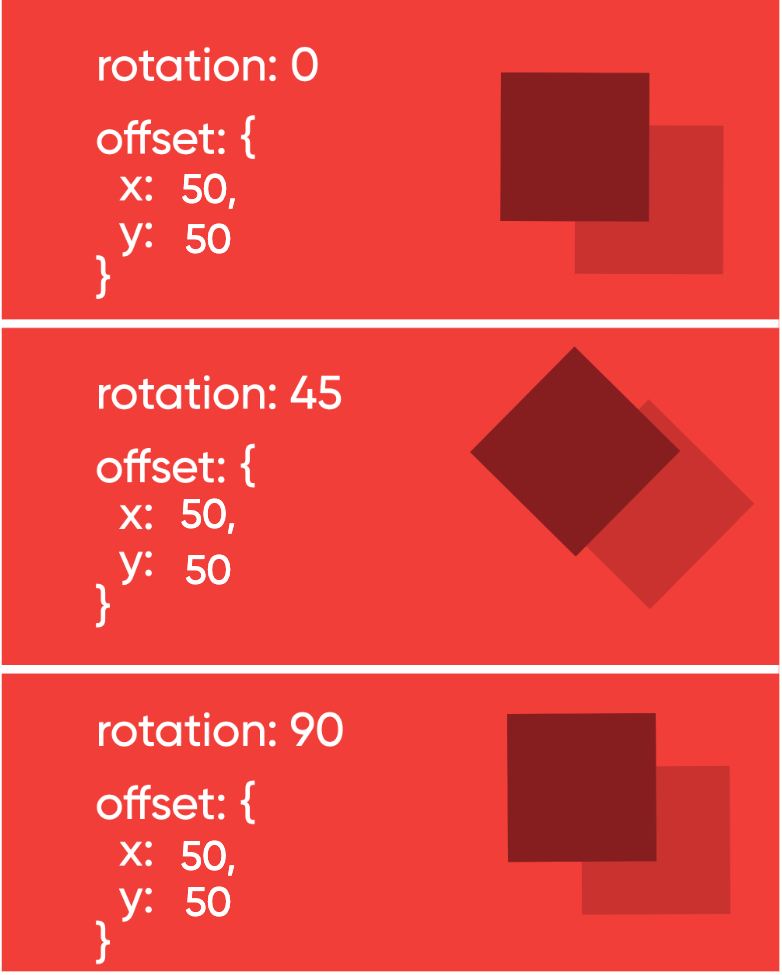 |
IReplayLayerBlendMode
- Web
- Android
- IOS
import type { IReplayLayerBlendMode } from '@picsart/web-replay-sdk';
type IReplayLayerBlendMode =
  | 'source-over'
  | 'source-in'
  | 'source-out'
  | 'source-atop'
  | 'destination-over'
  | 'destination-in'
  | 'destination-out'
  | 'destination-atop'
  | 'lighter'
  | 'copy'
  | 'xor'
  | 'multiply'
  | 'screen'
  | 'overlay'
  | 'darken'
  | 'lighten'
  | 'color-dodge'
  | 'color-burn'
  | 'hard-light'
  | 'soft-light'
  | 'difference'
  | 'exclusion'
  | 'hue'
  | 'saturation'
  | 'color'
  | 'luminosity';
import com.picsart.media.primitives.enums.BlendMode
| Values | Description |
|---|---|
source-over | This is the default setting and draws new shapes on top of the existing canvas content. |
source-in | The new shape is drawn only where both the new shape and the destination canvas overlap. Everything else is made transparent. |
source-out | The new shape is drawn where it doesn't overlap the existing canvas content. |
source-atop | The new shape is only drawn where it overlaps the existing canvas content. |
destination-over | New shapes are drawn behind the existing canvas content. |
destination-in | The existing canvas content is kept where both the new shape and existing canvas content overlap. Everything else is made transparent. |
destination-out | The existing content is kept where it doesn't overlap the new shape. |
destination-atop | The existing canvas is only kept where it overlaps the new shape. The new shape is drawn behind the canvas content. |
lighter | Where both shapes overlap, the color is determined by adding color values. |
copy | Only the new shape is shown. |
xor | Shapes are made transparent where both overlap and drawn normal everywhere else. |
multiply | The pixels of the top layer are multiplied with the corresponding pixels of the bottom layer. A darker picture is the result. |
screen | The pixels are inverted, multiplied, and inverted again. A lighter picture is the result (opposite of multiply) |
overlay | A combination of multiply and screen. Dark parts on the base layer become darker, and light parts become lighter. |
darken | Retains the darkest pixels of both layers. |
lighten | Retains the lightest pixels of both layers. |
color-dodge | Divides the bottom layer by the inverted top layer. |
color-burn | Divides the inverted bottom layer by the top layer, and then inverts the result. |
hard-light | Like overlay, a combination of multiply and screen — but instead with the top layer and bottom layer swapped |
soft-light | A softer version of hard-light. Pure black or white does not result in pure black or white. |
difference | Subtracts the bottom layer from the top layer — or the other way round — to always get a positive value. |
exclusion | Like difference, but with lower contrast. |
hue | Preserves the luma and chroma of the bottom layer, while adopting the hue of the top layer. |
saturation | Preserves the luma and hue of the bottom layer, while adopting the chroma of the top layer. |
color | Preserves the luma of the bottom layer, while adopting the hue and chroma of the top layer. |
luminosity | Preserves the hue and chroma of the bottom layer, while adopting the luma of the top layer. |
Cross-Platform Mapping
| Web | Android (API 29+) | iOS |
|---|---|---|
source-over | SRC_OVER | Normal |
source-in | SRC_IN | Source In |
source-out | SRC_OUT | Source Out |
source-atop | SRC_ATOP | Source Atop |
destination-over | DST_OVER | Destination Over |
destination-in | DST_IN | Destination In |
destination-out | DST_OUT | Destination Out |
destination-atop | DST_ATOP | Destination Atop |
lighter | ADD | Plus Lighter |
multiply | MULTIPLY | Multiply |
screen | SCREEN | Screen |
overlay | OVERLAY | Overlay |
darken | DARKEN | Darken |
lighten | LIGHTEN | Lighten |
color-dodge | COLOR_DODGE | Color Dodge |
color-burn | COLOR_BURN | Color Burn |
hard-light | HARD_LIGHT | Hard Light |
soft-light | SOFT_LIGHT | Soft Light |
difference | DIFFERENCE | Difference |
exclusion | EXCLUSION | Exclusion |
hue | HUE | Hue |
saturation | SATURATION | Saturation |
color | COLOR | Color |
luminosity | LUMINOSITY | Luminosity |
xor | XOR | XOR |
For more information check this link